 kagent
Build a Personal AI Assistant with kagent and Agent Substrate#
A personal assistant is the perfect first agent. It's small enough to build in fifteen minutes, and it's useful the same day: it answers in your style, checks the weather, and has a plan for your day waiting before you've finished your coffee.
It's also the perfect agent for understanding what runs underneath kagent. A personal assistant does almost nothing all day. It answers a question, then waits hours for the next one. It writes one morning brief, then goes quiet until tomorrow. That shape of workload (a few seconds of work, hours of waiting) is exactly what Agent Substrate was built for.
So this tutorial does two things:
- Builds the assistant, click by click in the kagent UI: a personality, a tool, and a schedule.
- Opens the hood at each step to show what Agent Substrate, the engine, is doing while you click.
By the end, you have one agent named personal-assistant that answers in your style, looks up the weather, and leaves a plan for your day in a conversation every morning. And you'll know why it costs you almost nothing while it waits.
The car and the engine#
Here's the simplest way I can put the relationship: kagent is the car, and Agent Substrate is the engine.
kagent is the part you touch. It has the steering wheel and the dashboard: the UI, the Agent resource, the system prompt, MCP tools, schedules, and the conversations themselves. It knows what an agent is for.
Agent Substrate is the part that makes it move. It doesn't know what a personal assistant is, or what a conversation is. It knows how to run a sandboxed process, put it to sleep when it's idle, and wake it up when a request arrives. In kagent 1.0, every agent runs on it. There's no other runtime underneath.
Or, as we put it in the 1.0 release post: kagent decides what an agent does, and Agent Substrate decides where it runs.
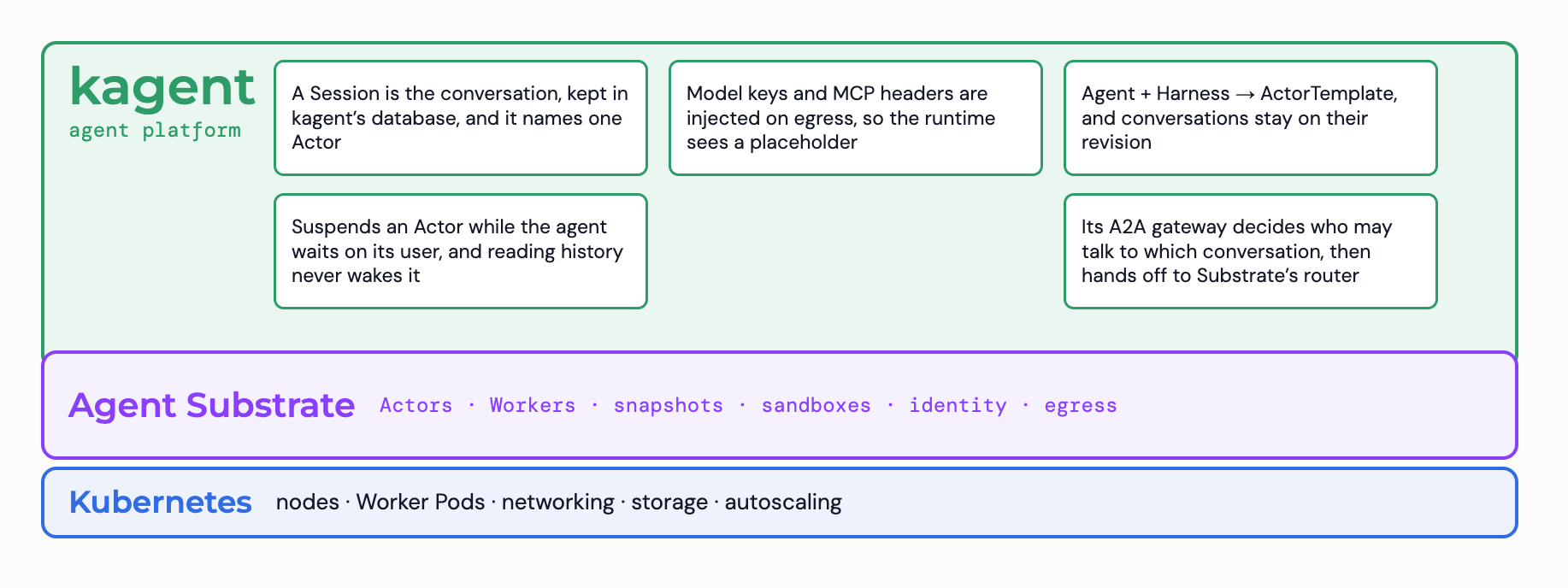
You only need four engine terms to follow the rest of this post:
| Term | What it is | In this tutorial |
|---|---|---|
| Actor | The unit of compute that Substrate runs, suspends, and resumes. Each one lives in its own sandbox. | Every conversation with your assistant runs on its own Actor. |
| Worker | A pod that Substrate starts in advance. One Worker hosts many Actors. | Where your assistant runs while it's actually working. |
| WorkerPool | The set of warm Workers, and the sandbox technology they use. | kagent install creates one for you, named kagent-default. |
| Snapshot | An Actor's durable data, written to object storage when it suspends. | Where your assistant "is" while it waits for you. |
Keep those in mind. Each step below maps onto them.
Before you begin#
-
Have a Kubernetes cluster at version 1.37 or later. Agent Substrate uses certificate APIs that went GA in 1.37. No cluster handy? A local kind cluster works fine:
kind create cluster --name kagent --image kindest/node:v1.37.0 -
Install the kagent CLI, set your model provider key (OpenAI is the default), and install. One command sets up Agent Substrate, PostgreSQL, and kagent together:
curl -sL https://raw.githubusercontent.com/kagent-dev/kagent/refs/heads/main/scripts/get-kagent | bash -s -- --version v1.0.0export OPENAI_API_KEY=<your key>kagent install -
Open the kagent UI:
kagent dashboard -
Make sure that your cluster can reach the internet. The weather tool in this tutorial is a public server.
Under the hood: notice that you never installed "an agent runtime" as a separate step. kagent install put the engine in first. You now have Substrate's control plane running, plus a kagent-default WorkerPool with warm Workers using the gVisor sandbox class. Nothing is running on those Workers yet. They're just ready.
Step 1: Create the assistant#
Start with who the assistant is. Its system prompt is where you describe how it should behave.

-
In the sidebar, click Agents, and then click New Agent.
-
In the Name field, enter
personal-assistant. Leave the Namespace askagent, and leave Shared harness set tokagent-default. -
In the Template section, select Inline, and fill in the template.
Field Value Model configuration kagent/default-model-configDescription My personal assistantSystem prompt You are my personal assistant. Be friendly and concise. Help me plan my day, draft messages, and answer questions.Make the prompt your own. Tell the assistant what you do, how long its answers should be, and anything that it should always or never do.
-
Click Create agent, and then click Refresh until the status changes from Preparing to Ready.
-
Click the agent name to open its chat page, and say hello. Ask it to draft a message or to plan a task.
Under the hood: two things in that form are the engine showing through.
- Shared harness:
kagent-default. The template you filled in is what the assistant does: model, prompt, tools. The harness is how it's allowed to run: which WorkerPool hosts it, and where its snapshots go. You just pointed your assistant at the default engine configuration without writing a line of it. - Preparing → Ready. That wait isn't a pod starting. The kagent controller compiles your agent into an ActorTemplate on Substrate, and Substrate boots the workload once to capture a golden snapshot. Every new conversation with your assistant starts from that snapshot instead of from a cold boot. Ready means the snapshot exists.
Then you said hello. That first message created a Session, and the Session's Actor was resumed onto a warm Worker, inside its own gVisor sandbox. When the reply finished, kagent suspended the Actor again. It doesn't wait for a long idle timeout. It suspends at every turn boundary, as soon as nothing in the conversation is running.
Step 2: Give it the weather#
An assistant that can only talk can't tell you whether to take an umbrella. Tools come from Model Context Protocol (MCP) servers, so register a weather server, and then hand its tool to the assistant.

-
In the sidebar, click MCP Servers, and then click New Server.
-
Fill in the form, and then click Create server.
Field Value Name weatherServer URL mcp-weather-1cyg.onrender.com/mcpTLS HTTPS -
Click Refresh until the
weatherserver shows1in the Tools column. Expand the row to see the tool,get_weather. -
In the sidebar, click Agents. In the row of the
personal-assistantagent, click the edit icon. -
Under Tools from MCP servers, click Add an MCP server, and choose
kagent/weather. -
Click Save agent, and wait until the agent returns to Ready.
-
Open a New chat with the assistant, and ask
What is the weather in Toronto right now?
Note: The weather server is a public demonstration server that the kagent project does not run. It can be slow to answer its first request, and it can change or go away.
Under the hood: this step is where the engine starts earning its keep.
- The sandbox matters now. Your assistant just went from "talks" to "calls things on the internet because a model told it to". That's why Substrate doesn't run plain containers. Every Actor runs in its own sandbox, and with the default gVisor class, the workload's system calls never reach the host kernel.
- Saving the agent made a new revision. Substrate rejects changes to an existing ActorTemplate, so kagent compiled a new one with the weather tool in it. That's the second Ready wait. It's also why step 7 says New chat: a conversation stays on the revision it started with, and new conversations pick up the edit. Your "hello" conversation from step 1 is still safely running the tool-less version.
Step 3: Give it a morning routine#
The assistant now answers when you ask. A schedule makes it start the conversation: every morning, it writes a plan for your day.

-
In the sidebar, click Schedules, and then click New Schedule.
-
From the Agent list, choose
kagent/personal-assistant, and entermorning-briefin the Name field. -
Set Time zone to your own, leave Repeat set to Daily, and set At time to when you start your day.
-
In the Prompt field, enter what you want every morning, such as the following.
Give me a short plan for today: three priorities and one reminder to take a break. Include the weather in Toronto. -
Leave Enable Schedule on, and click Create schedule.
-
To see a brief now, click Run on the page of the schedule. Each run appears in the Execution history table, with a link to its conversation.
Under the hood: this is the step that would be painful without Substrate.
Think about what a daily brief looks like as a workload. It needs compute for the few seconds it takes to call the weather tool and write three priorities. Then it needs nothing for the next 24 hours. On a Deployment-based runtime, you'd keep a pod running all day and all night to do a few seconds of work.
On Substrate, each execution of the schedule starts a new Session. Its Actor resumes onto a warm Worker, does the work, and suspends. Between runs, your assistant holds no Worker at all. And the brief is a real conversation: open it from Execution history, reply "move the second priority to tomorrow", and the Actor resumes and picks up right where the brief left off.
Watch the engine run#
You've been taking my word for it. Let's look.
In the UI#
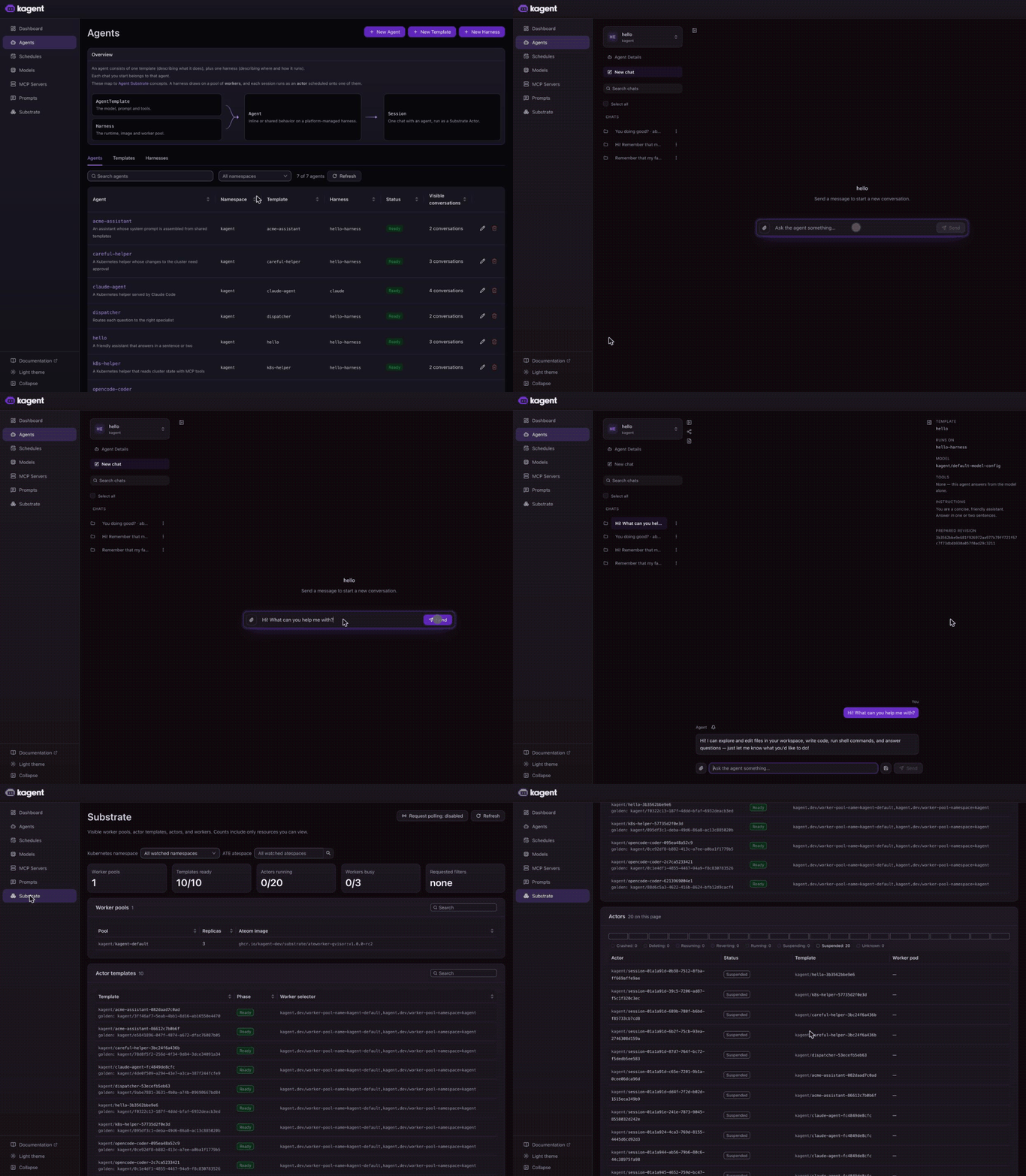
Click Substrate in the sidebar. This page is the engine's own dashboard: your WorkerPool, its Workers, and every Actor with its state. Send your assistant a message in one tab and watch this page in another. The Actor goes to running, the reply lands, and the Actor goes back to suspended.
From the command line#
Install kubectl-ate, the Agent Substrate command line tool:
curl -fsSL -o kubectl-ate \"https://github.com/kagent-dev/substrate/releases/download/v1.0.0/kubectl-ate-$(uname -s | tr '[:upper:]' '[:lower:]')-$(uname -m | sed 's/x86_64/amd64/; s/aarch64/arm64/')"chmod +x kubectl-atesudo mv kubectl-ate /usr/local/bin/
Then list the Actors behind your assistant's conversations:
kubectl ate get actors --atespace kagent
Between turns, each Actor reports ACTOR_STATE_SUSPENDED, and the ATEOM POD column reads <none> because the Actor holds no Worker. Example output:
ATESPACE NAME TEMPLATE STATE ATEOM POD ATEOM IP VERSION AGEkagent session-0198c3d7-4f2a-7b61-9c3e-5d8f7a2b4e10 kagent/personal-assistant-5f2b3c1a9e8d ACTOR_STATE_SUSPENDED <none> 4 11m
Send the assistant a message and run the command again while it's answering. The state flips to ACTOR_STATE_RUNNING, and a Worker pod and IP appear. Run it once more after the reply, and it's back to suspended.
A few things worth noticing:
- Each conversation is its own Actor, named
session-<session-id>. Your "hello" chat, your weather chat, and each morning brief are separate Actors in separate sandboxes. - The Session never stopped being ready. In the kagent UI, your conversations look available the whole time. Suspension is a property of the engine underneath the conversation, not of the conversation. You never have to "wake" your assistant. You just message it.
- Resume lands on any Worker with room. The Actor doesn't go back to the Worker it was on before. It doesn't need to, because its state lives in the snapshot, not on the pod.
What the engine actually bought you#
Step back and look at what you built: an assistant that's idle more than 99% of the time. Here's what Substrate did with that, without you configuring any of it.
| What you did | What Agent Substrate did |
|---|---|
Ran kagent install | Stood up warm Workers in a gVisor WorkerPool, ready before any agent existed |
| Clicked Create agent | Captured a golden snapshot, so new conversations skip the cold boot |
| Sent a message | Resumed the conversation's Actor onto a warm Worker, in its own sandbox |
| Stopped typing | Wrote the Actor's durable data to a snapshot and released the Worker |
| Added a tool | Took a new immutable ActorTemplate, leaving running conversations untouched |
| Scheduled a daily brief | Ran a few seconds of compute a day, instead of a pod around the clock |
One assistant doesn't save you much. But the same engine behavior is why a team of fifty people can each have their own assistant, each with a handful of open conversations, on a small pool of Workers. Suspended Actors don't hold a Worker, so the pool is sized for how many assistants are working at the same moment, not how many exist.
There's one honest trade-off: because kagent suspends at every turn boundary, every message pays for one resume. That's the engine doing its job, and the Agent Substrate calculator will give you wake-up time and sizing estimates for your own setup.
Where to take it next#
Your assistant is one agent with a prompt, a tool, and a schedule. Each of these makes it more capable.
| Idea | How |
|---|---|
| Let it search documentation | Register a second MCP server, such as search.solo.io/mcp, and add it to the assistant. |
| Make it ask before it acts | Turn on approval for a tool in the assistant's edit form. The assistant suspends while it waits for your answer, so a pending approval costs no compute. |
| Share its voice with other agents | Keep its tone and rules in a prompt library that several agents reuse. |
| Run it on another model | Add a second model configuration, and choose it in the assistant's edit form. |
| Save a conversation worth keeping | Checkpoint it, and fork a new conversation from that point. A checkpoint pins the snapshot that Substrate would otherwise collect. |
The YAML version#
Everything that you did in the UI, apart from the schedule, is stored as Kubernetes resources. To create the same resources from the command line, or to keep them in a Git repository, apply this YAML.
The weather MCP server:
kubectl apply -f - <<EOFapiVersion: api.kagent.dev/v1alpha3kind: RemoteMCPServermetadata:name: weathernamespace: kagentspec:protocol: STREAMABLE_HTTPurl: https://mcp-weather-1cyg.onrender.com/mcptimeout: 5sterminateOnClose: trueEOF
The personal-assistant agent, with the weather tool:
kubectl apply -f - <<EOFapiVersion: api.kagent.dev/v1alpha3kind: Agentmetadata:name: personal-assistantnamespace: kagentspec:harnessRef:name: kagent-defaulttemplate:inline:description: My personal assistantmodelConfig:name: default-model-configsystemPrompt: |-You are my personal assistant. Be friendly and concise. Help me plan my day, draft messages, and answer questions.tools:- mcp:server:kind: RemoteMCPServername: weatherEOF
Look at harnessRef. That one field is the whole connection between the car and the engine: the template says what your assistant does, and the harness says which WorkerPool runs it and where its snapshots go. Point the same template at a harness backed by a bigger pool, or at one using the micro-VM sandbox class, and the prompt and tool list don't change at all.
A schedule is not a Kubernetes resource, so it has no YAML. kagent stores schedules in its database. To create one without the UI, use kagent's ScheduledRunService gRPC API.
Wrapping up#
In about fifteen minutes, you built an assistant with a personality, a tool, and a morning routine, and you never wrote a Deployment, sized a pod, or thought about what happens to it overnight.
That's the point. kagent gave you the parts worth caring about: the prompt, the tools, the schedule, the conversations. Agent Substrate handled the part you shouldn't have to care about: where the assistant runs, how it's isolated, and what it costs while it waits. A good engine is one you forget is there.
Want to go deeper?
- kagent 1.0 Is Here: Open Source Agents on Agent Substrate: why kagent moved every agent onto Substrate.
- Is a Pod the right deployment unit for an AI agent?: the problem Substrate solves.
- Install Agent Substrate on Any Kubernetes Cluster: the engine on its own.
- Get involved: kagent on GitHub and Agent Substrate on GitHub.